
React JS Bootcamp in Chennai
Introduction to React & JSX:
Best JS React Bootcamp in Chennai, a JavaScript library created by Facebook for creating dynamic user interfaces, is given in the “Introduction to React & JSX” module of React JS Bootcamps in Chennai. This module discusses the history of React, its fundamental ideas, and the importance of JSX (JavaScript XML), which enables programmers to create HTML-like syntax inside JavaScript. The virtual DOM, how to set up the React development environment, and how to use the React Developer Tools for effective debugging are all taught to students. Learners may create web applications that are responsive and maintainable by grasping these foundational concepts.
Reacts Components and props:
The Components and Props module is essential to React JS Bootcamps in Chennai since it introduces students to the component-based architecture of React. The development and differentiation of functional and class components are covered in this topic, with a focus on their modularity and reusability. Students gain knowledge of component state management, lifecycle techniques for efficient component maintenance, and how to use props to transmit data across components.
State Management & Event Handling in React in React Bootcamp in Chennai:
The State Management & Event Handling module is essential for creating dynamic and responsive applications at React JS Bootcamps in Chennai. With the help of the use State and use Effect hooks, this module explores component state management, empowering developers to effectively manage side effects and data changes. Students investigate the idea of lifting state up to allow components to communicate data and comprehend the significance of immutability in state updates. Another crucial component is event management, where students learn how to control user interactions by supplying arguments to event functions, binding event handlers, and using Reacts synthetic event system.
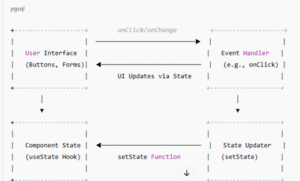
- User Interface (UI): Represents the interactive elements like buttons and forms that users interact with.
- Event Handler: Functions such as on Click or on Change that respond to user interactions.
- State Updater (set State): Functions provided by Reacts use State hook to update the component’s state based on events.
- Component State: Holds the current state of the component, which determines what is rendered in the UI.
When a user interacts with the UI the corresponding event handler is triggered. This handler uses the set State function to update the component’s state. React then re-renders the UI to reflect the new state, completing the cycle.
React Hooks &Routing with React Router:
To learn current front-end development, the “React Hooks & Routing with React Router” module is essential in React JS Bootcamps in Chennai. By exploring React Hooks like useState, useEffect, and useContext, this module helps developers effectively handle state and side effects inside functional components. It also discusses React Router, a potent tool for managing client-side routing in one-page apps. To construct smooth user experiences, learners experiment with managing navigation, nested route implementation, and route definition.
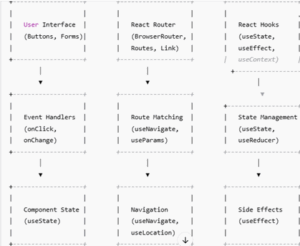
i) User Interface (UI): Represents interactive elements like buttons and forms that users interact with.
ii) Event Handlers: Functions such as onClick or onChange that respond to user interactions.
iii) Component State: Managed using the useState hook, it holds the current state of the component, which determines what is rendered in the UI.
iv) React Router:
- Browser Router: Wraps the application to enable routing.
- Routes: Defines the mapping between URL paths and components.
- Link: Provides navigation between routes.
v) Route Matching: Handles navigation and URL matching using hooks like useNavigate and useParams
vi) React Hooks:
- useState: Manages local component state.
- useEffect: Handles side effects such as fetching data or subscribing to external data sources.
- useContext: Shares state across multiple components without prop drilling.
Form Handling and Validation & Integration with APIs:
React Bootcamps focus on creating controlled components, which employ the useState hook to link form inputs to component state. This method guarantees that the user interface and the underlying data model are in real-time synchronization. The following validation methods are taught to guarantee data integrity:
- Client-side validation: Implementing checks within the program to give users instant feedback is known as client-side validation.
- Third-Party Libraries: Making use of fortified form management and schema-based validation solutions such as Yup and Formik.
Integration with APIs:
A basic feature of contemporary web apps is the ability to communicate with external APIs.
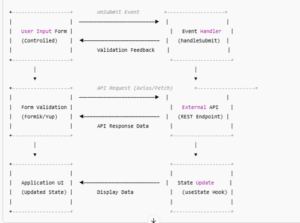
- Retrieving data from RESTful APIs using fetch or Axios is known as data fetching.
- Async/await syntax for managing asynchronous calls and loading states are examples of asynchronous operations.
- Try-catch blocks are used in error handling to elegantly manage mistakes that arise during API interactions
Capturing the fundamental ideas covered in React JS Bootcamps, this diagram shows how data moves from user input to validation, API communication, and UI refresh.
State Management With Redux:
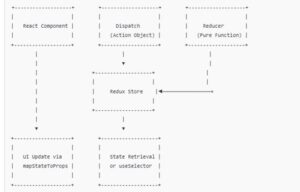
Learning State Management with Redux is crucial for creating scalable and maintainable applications in React JS Bootcamps all throughout Chennai. Redux functions as a predictable state container, centralizing the state of the application and enabling unidirectional data flow, making testing and debugging easier. To efficiently handle intricate state exchanges, participants learn how to use fundamental Redux ideas, such as actions, reducers, and the store.
Testing and Debugging React:
Multiple stages of testing are performed on React applications.
- Unit testing: Confirms the functionality of individual parts. Commonly used tools include the React Testing Library and Jest.
- Integration testing: Verifies that the application’s various components function as intended.
- End-to-End (E2E) testing: This method tests the application’s flow by simulating actual user scenarios. Popular options for E2E testing are Cypress and Puppeteer.
- React Developer Tools: Examine state, properties, and component hierarchies.
- Redux Dev Tools: Track dispatched actions and state changes in Redux-enabled applications.
- Chrome Dev Tools: Examine network requests, debug JavaScript code, and profile performance.
Deployment and Server-Side Rendering (SSR):
Preparing the React application for production is part of deployment.
- Building the Application: Bundle the application using programs like Vite or Webpack.
- Configure the environment by setting up variables for the development, staging, and production phases.
- Hosting: Use Node.js to deploy the application on conventional servers or on platforms such as Netlify and Vercel..
- By rendering React components on the server, Server-Side Rendering (SSR) improves SEO and perform an Next are frameworks. A well-liked framework that makes SSR in React apps easier is called JavaScripts.
- Hydration: React adds event listeners on the client-side to make the application interactive once the server renders the HTML.
- Data Fetching: Fetch necessary data on the server before rendering to guarantee the client obtains a completely populated page.
- Error Handling: To detect and elegantly handle mistakes, use error boundaries.
Frequently Asked Questions
- Which Bootcamp is “best”?
When it comes to React training in Chennai, there’s no one-size-fits-all answer — but if you’re considering Maria Academy, it can be a strong choice for learners who want experienced trainers (9–12 years), hands-on projects, affordable fees, and placement assistance with ties to MNCs.
- Are placements guaranteed?
Claims of guaranteed placements are common—but verify details. Maria Academy offer placement assistance, but real success often depends on your own efforts, ongoing practice, and interview prep.
- How to evaluate an institute?
i) Project work and portfolio support.
ii) Resume, mock interviews, and placement guidance
iii) Mentorship and support beyond sessions
iv) Flexibility (timings, online/offline options).
v) Refund or installment policies.
- What else should I learn along with React?
Strong JavaScript fundamentals (ES6+), modern state management (Redux, Context), routing (React Router), API integration, and deployment practices make you job ready. Full-stack knowledge or familiarity with frameworks like Next.js can be a bonus.
- What’s the ideal approach?
i) Learning Maria Academy Classes deeper to practice and Building real projects—one small, one medium (e.g., Todo app and blog dashboard).
ii) Contributing code to GitHub and showcasing on a personal site or LinkedIn.
iii) Networking with developers via forums or local meetups.
Social tagging: best react js Bootcamp in Chennai > Free Bootcamp for Chennai > React js Bootcamp in chennai
Recent Posts
- Banking Sector: Tackling Security and Data Integrity Challenges with .NET Skills
- How Data Analytics Helps Manufacturers in Bangalore Reduce Production Downtime
- Understanding ASP.NET MVC Architecture with Real Examples
- Common Challenges in Learning Programming and How Python Makes It Easier
- Why Companies Are Hiring More React Developers Than Ever Before
Categories
- All
- Angularjs training in Chennai
- ASP.NET Core
- Data Analytics
- Dot Net Development Course
- dot net training
- dot net training in chennai
- dotnet full stack developer
- Free dotnet training
- information on dotnet
- Learn Java in chennai
- Learn Python at Karaikudi
- learn python online
- learn python online from chennai
- Linq Queries in .net
- mutual funds
- MVC Training Tutorials
- PHP Training in Chennai
- pmp training online
- power apps online training
- Power platofrm
- Python Training Online
- React Full Stack Development
- React training
- ReactJs
- share market
- Sharepoint framework online training
- SharePoint Freelancers in Chennai
- software testing
- spfx online training
- SQL Course Details
- Stock market
- Uncategorized