
Free SQL Course
Structured Query Language (SQL) is an essential skill for anyone working with databases. Whether you’re a beginner or looking to enhance your database knowledge, this free SQL course will provide you with the foundational skills needed to interact with databases efficiently.
Why Learn SQL
SQL is the standard language for managing and manipulating databases. It is used across various industries, including technology, finance, healthcare, and more. Mastering SQL can open doors to numerous career opportunities, such as database administration, data analysis, and backend development.
Benefits of Learning SQL:
- High Demand Skill: Many companies require SQL expertise for data-driven decision-making.
- Easy to Learn: SQL syntax is straightforward and resembles natural language.
- Universal Application: Works with various database management systems (DBMS) like MySQL, PostgreSQL, SQL Server, and SQLite.
- Career Growth: Opens opportunities in data science, business intelligence, and software development.
Why Use SQL :
- SQL allows users to access data in relational database management systems.
- It enables users to describe and define the data within the database, as well as manipulate that data effectively.
- Additionally, SQL can be embedded within other programming languages using SQL modules, libraries, and pre-compilers.
- Users have the capability to create and drop databases and tables, along with creating views, stored procedures, and functions.
- Moreover, SQL allows users to set permissions on tables, procedures, and views, ensuring proper access control.
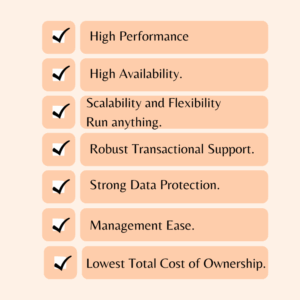
Features of SQL :
Grow Your Skills with Us
We’re excited to offer this course as part of a variety of programs. When you sign up, you’ll get to pick a program that suits you best!
- Discover new ideas with guidance from industry experts.
- Build a solid understanding of different subjects or tools.
- Enhance your job skills with fun, hands-on projects.
- Earn a career certificate you can proudly share!
Free SQL Course Platforms
You can find free SQL courses on:
- Khan Academy (Introduction to SQL)
- W3Schools (Interactive SQL Tutorial)
- Mode Analytics SQL Tutorial
- SQLZoo (Interactive SQL Practice)
- Coursera (Audit Option) (University Courses)
- Udacity (Intro to Relational Databases)
- Code-Academy (Basic SQL Track Free Version)
Advantages of SQL:
SQL (Structured Query Language) is widely used for managing and manipulating relational databases.
Easy to Learn and Use
- SQL uses simple English-like commands (e.g., SELECT, INSERT, UPDATE, DELETE), making it beginner-friendly.
Standardized Language
- SQL is a widely adopted standard supported by most database management systems (DBMS) like MySQL, PostgreSQL, SQL Server, and Oracle.
High Performance
- SQL databases are optimized for speed and scalability, handling complex queries and large volumes of data efficiently.
Scalability
- SQL databases can handle vast amounts of data and are scalable for growing business needs.
Integration with Programming Languages
- SQL can be integrated with various programming languages like Python, Java, PHP, and C# for seamless application development.
Frequently asked questions about SQL
- What is the primary key in SQL?
A primary key is a unique identifier for each record in a table. It ensures that every row in the table contains a distinct and non-null value in the primary key column. Primary keys are essential for enforcing data integrity and establishing relationships between tables.
- What is a constraint in SQL? Name a few.
A constraint in SQL is a crucial rule that governs the data in a table, ensuring that the information remains accurate and reliable. Among the most essential constraints are:– PRIMARY KEY: This guarantees that every value in a designated column is unique, eliminating duplicates.
– FOREIGN KEY: This maintains referential integrity, connecting tables and ensuring consistent relationships between them.
– UNIQUE: This constraint safeguards against duplicate values in a column, promoting data integrity.
– CHECK: This specifies conditions that data must be fulfilled before insertion or updates, enhancing data validation.
– NOT NULL: This ensures that crucial columns cannot contain NULL values, promoting completeness of data.
- What is the view in SQL?
In SQL, a view is a virtual table that is derived from the result set of an SQL statement. A view consists of rows and columns similar to a real table. The fields in a view are taken from one or more actual tables within the database.
- What is the trigger in SQL?
A trigger in SQL is a predefined sequence of actions that automatically execute when a specific event occurs, such as when an INSERT or DELETE operation is performed on a table. Triggers are used to ensure data consistency, conduct auditing, and simplify various tasks.
- What are aggregate functions? Can you name a few?
Aggregate function in SQL performs calculations on a set of values and return a single result.- MIN() – returns the smallest value within the selected column.
- MAX() – returns the largest value within the selected column.
- COUNT() – returns the number of rows in a set.
- SUM() – returns the total sum of a numerical column.
- AVG() – returns the average value of a numerical column.
Conclusion:
This free SQL course provides a structured learning path to help you gain proficiency in SQL. By following along with the modules and practicing regularly, you’ll be able to master SQL and apply it effectively in various fields like data analysis, software development, and database administration.
ONLINE SQL COURSE
Unlock your potential with our comprehensive online SQL courses, designed for everyone from beginners to advanced learners.
Elevate your data handling skills with engaging courses that encompass everything from the essentials of SQL to specialized SQL for Data Analysis.
Enroll today and earn valuable certificates that will highlight your SQL expertise and set you apart in the job market!
PREREQUISITES FOR ONLINE SQL TRAINING :
- Basic Computer Knowledge – Familiarity with using a computer and navigating software applications.
- Understanding of Databases – A general idea of what databases are and how data is stored can be beneficial but is not mandatory.
- Logical Thinking & Problem-Solving Skills – Helps in writing and optimizing SQL queries.
- Basic Knowledge of Excel or Spreadsheets – Understanding tables and data organization is a plus.
WHY CHOOSE LIVE SQL TRAINING :
- Real-Time Instructor-Led Classes – Get direct guidance from experienced SQL professionals.
- Hands-On Learning – Practice SQL queries in live coding environments.
- Q&A and Doubt Resolution – Get instant answers to your questions during the session.
- Structured Curriculum – Covers SQL fundamentals, advanced queries, database optimization, and more.
- Flexible Schedules – Choose batches that fit your availability.
- Communication Tools: Familiarize yourself with the communication platforms or tools used by the training provider, such as Zoom, Microsoft Teams, Slack, or others.
- Technical Support: Know how to contact technical support in case you face any issues with accessing the live sessions or course materials.
BENEFITS OF SQL ONLINE TRAINING
- Learn at Your Own Pace – Access course materials anytime, anywhere, and progress at your convenience.
- Hands-On Practice – Work on real-world projects, interactive exercises, and live coding environments.
- Expert Guidance – Learn from experienced instructors with industry knowledge and practical insights.
- Industry-Recognized Certification – Earn a certificate that boosts your resume and career prospects.
- Cost-Effective Learning – Get high-quality training at a fraction of the cost of traditional classroom programs.
- Flexible Learning Modes – Choose from self-paced, live online, or instructor-led training.
- Career Growth Opportunities – Gain in-demand SQL skills for roles in data analysis, software development, and database administration.
TRAINER PROFILE
The trainers at Maria Academy are professional experts in SQL courses and have extensive experience in the field.
They provide a comprehensive learning experience, ensuring that students not only grasp theoretical concepts but also gain practical skills that can be applied in real-world scenarios. with a minimum of 8 years of industry experience.
They are well-versed in handling complex real-time projects. Our mentors provide personalized mentorship, career guidance, and practical insights based on their extensive experience in the field.
Mariya Academy’s trainers emphasize both theoretical and practical knowledge of the SQL language.
WHY ONLINE BOOTCAMP
Fast-Track Learning
- Bootcamps are designed to teach you SQL quickly—often within weeks.
- Perfect if you’re trying to switch careers, prep for a job interview, or start a data-related role fast.
Hands-On Practice
- Most bootcamps include real-world projects, exercises, and challenges, not just theory.
- You actually write queries, clean data, and build reports—just like on the job.
Career-Oriented
- Many bootcamps offer job support, mock interviews, or certifications to add to your resume.
- SQL is a top skill for roles like Data Analyst, Business Analyst, Data Engineer, etc.
FREQUENTLY ASKED QUESTION
- What are the benefits of learning SQL?
Mastering SQL empowers you to efficiently retrieve the data you need, leveraging the full potential of the database engine. With SQL skills, you can confidently navigate any relational database system available today. This ability not only enhances your versatility but also makes you an invaluable asset in the job market, regardless of the software or employer.
- What is the difference between DBMS and RDBMS?
DBMS stands for Database Management System, while RDBMS stands for Relational Database Management System. In a DBMS, data is stored as files, whereas in an RDBMS, data is organized in the form of tables.
- What is a “trigger”?
Triggers are stored procedures that enforce integrity rules in a database. They automatically execute when data-modification operations occur, such as inserts, updates, or deletes. Associated with specific tables, triggers activate in response to relevant statements like insert, update, delete, and query.
- What is Auto Increment feature in SQL?
Auto Increment is a feature in SQL that automatically generates unique values for a column whenever new rows are inserted into a table. This feature is commonly used to create surrogate keys, such as primary keys, which serve as unique identifiers for each row in a table.
- What is joining in SQL?
A JOIN in SQL is a command that combines records from two or more tables in a database. It allows you to merge data from fields in different tables based on common values present in each table. If you work with databases, you will likely need to use SQL JOINs to retrieve and manipulate related data effectively.
Recent Posts
Categories
- All
- Angularjs training in Chennai
- ASP.NET Core
- Dot Net Development Course
- dot net training
- dot net training in chennai
- dotnet full stack developer
- Free dotnet training
- information on dotnet
- Learn Java in chennai
- Learn Python at Karaikudi
- learn python online
- learn python online from chennai
- Linq Queries in .net
- mutual funds
- MVC Training Tutorials
- PHP Training in Chennai
- pmp training online
- power apps online training
- Python Training Online
- React Full Stack Development
- ReactJs
- share market
- Sharepoint framework online training
- SharePoint Freelancers in Chennai
- software testing
- spfx online training
- SQL Course Details
- Stock market
- Uncategorized